
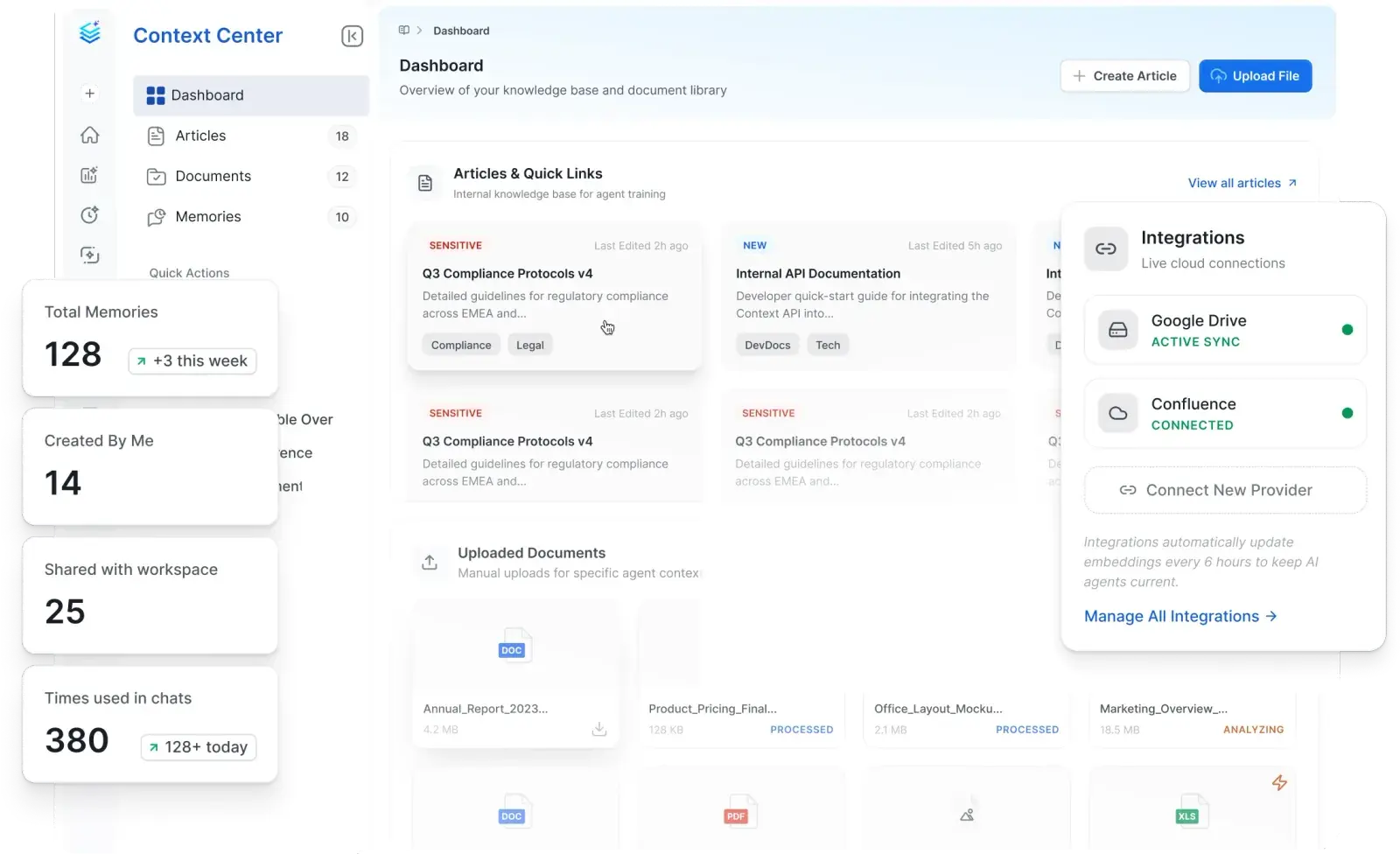


One Home for Articles, Documents, and Memories
Author articles, upload documents, create memories, and pull from Confluence and Google Drive in one place

Knowledge Connected to Your Data
Context Center assets inherit the same governance, metadata, and access controls as your data

Context for Collate AI
Context Center assets and all integrated knowledge become first-class context for grounded AI answers
One Home for Articles, Documents, and Memories
A knowledge base and document library, native to Collate
![[object Object]](/_next/image?url=%2Fimages%2Fcontext-center%2Farticles-and-documents.webp&w=3840&q=75)
Knowledge connected to your data
Context Center assets inherit the same metadata as your data assets
![[object Object]](/_next/image?url=%2Fimages%2Fcontext-center%2Fknowledge-connected-to-data.webp&w=3840&q=75)
Pulls from where your knowledge already lives
Connect Confluence, Google Drive, and other sources without rewriting
![[object Object]](/_next/image?url=%2Fimages%2Fcontext-center%2Fpulls-from-where-knowledge-lives.webp&w=3840&q=75)
Context for Collate AI
Context Center assets become first-class context for grounded AI answers
![[object Object]](/_next/image?url=%2Fimages%2Fcontext-center%2Fcontext-for-askcollate.webp&w=3840&q=75)
Built for modern data & AI practices
Designed for changing needs of data & AI teams
AI-Driven Automation
Improve productivity, enforce governance and reduce costs with AI driven automation
Unified Platform
One platform for all your teams for data discovery, observability and governance
Collaborate Around Data
Accelerate development of data assets with social workspaces and knowledge centers
Get started with Collate today for free
Get Collate FreeManaged Service for Production Data Teams
Book a DemoFAQs
Context Center is the knowledge base and document library inside Collate. Teams author articles, upload documents in any common format, create asset-level memories, and connect external knowledge sources like Confluence and Google Drive. Articles, documents, and memories inherit the same metadata schema and governance as the rest of the data platform, and they are first-class context for Collate AI. Memories are asset-level instructions that tell Collate AI how to operate on that asset, and are useful for capturing information that previously only lived as tribal knowledge, like unique, situational data calculations.
Context Center is the replacement for Knowledge Center. Existing Knowledge Center customers get a richer surface with multi-format documents, external integrations, hierarchical articles, and direct Collate AI context. Existing articles carry over with their metadata and ownership intact. The migration is a rename and an upgrade, not a rebuild.
Confluence and Notion are general-purpose knowledge bases with no awareness of your data. Context Center is native to your data platform: articles and documents carry the same metadata as your datasets, inherit the same access controls, and surface in the same search. Articles can be tagged to specific data assets and glossary terms, so documentation stops drifting from the data it describes.
Context Center supports a wide range of formats including PDFs, spreadsheets (XLSX, CSV), text documents, images, video, and design files. Files enter a processing pipeline that surfaces status as Ready, Processing, Analyzing, or Failed, so teams know the state of their content at a glance.
Yes. Context Center has native integrations to external knowledge sources including Confluence and Google Drive. The Dashboard shows which integrations are active, which are connected, and how many sources are hooked up. Content from connected sources comes into the platform without a manual rewrite.
Articles, documents, memories, and existing connections are first-class context for Collate AI. The agent uses Context Center content to ground its responses in your team's canonical knowledge alongside the structured metadata it already reasons over. Access controls apply when content is used in the agent's response, so the agent only surfaces what the requesting user is permitted to see.
Yes. Articles, documents, and memories inherit the same role-based access controls (RBAC) that govern every other Collate action. Access controls apply when content is opened or used in agent responses, with details and actions requiring permission. The audit trail captures every change.
Yes. Every article carries the same metadata schema as your data assets, including Domains, Data Products, Owners, Reviewers, Tags, Glossary Term, and Data Assets. Tagging an article to a glossary term or a specific dataset means the article surfaces alongside that asset in lineage and search, and updates flow through automatically.
Context Center is one surface inside the unified Collate platform, alongside Discovery, Lineage, Observability, Marketplace, and Governance. Articles and documents share the same knowledge graph, the same RBAC engine, and the same audit trail as every other Collate action. There is no separate context store to maintain.
Existing Knowledge Center articles carry over to Context Center with metadata, ownership, and structure intact. The migration is a rename and an upgrade. Teams gain access to multi-format document upload, external integrations, hierarchical organization, and direct Collate AI context without losing prior work.